摘要
组长让我分享下mongo的技术,因为这块的功能是我自己做的,别人都没有涉及。
将这篇文章也作为博客吧。
正文
公司远程服务器版本4.2.14,本地版本4.4.6
目前主要使用MongoDb做一些非实时的大量的数据的统计功能。集中在接口日志-接口API通用 、日志管理 、统计功能
MongoDb是一个非关系型数据库,主要用来存储非结构化的数据。
Mongo将数据存储成一个文档,数据结构由key、value组成,类似于json,value值可以是一个对象(基本类型、List等)
MongoDb内部是基于V8引擎(2.4版本以后),通过JavaScript代码单线程执行操作。
遇事不决,就看官网,看不明白,不怪官网,自己太菜!
实际使用参考的所有文档
菜鸟教程 官方中文文档 MongoDB设置登录账号和密码_西瓜游侠的博客-CSDN博客_mongodb设置用户名和密码 Mongo 创建数据库_太阳上的雨天的博客-CSDN博客_mongo 创建数据库 MongoDB设置登录账号和密码_西瓜游侠的博客-CSDN博客_mongodb设置用户名和密码 mongodb开启权限验证、超级管理员、用户权限管理 - 古墩古墩 - 博客园 User Management Methods — MongoDB Manual 命令行获取帮助
命令db.help获取db下的所有方法 db.表名.find().help()获取find下的所有方法
展开
一、安装 1.1 windows 官网下载安装 以Windows为例。
详细安装教程
1.2 linux 官网 选择4.4.11,centos7.0,server,下载rpm包。
1
wget https://repo.mongodb.org/yum/redhat/7/mongodb-org/4.4/x86_64/RPMS/mongodb-org-server-4.4.11-1.el7.x86_64.rpm
进入服务器,关闭防火墙。
1
2
systemctl status firewalld
systemctl stop firewalld
安装mongo
1
rpm -ivh mongodb-org-server-4.4.11-1.el7.x86_64.rpm
提示创建关联mongo.service,表示成功。
修改mongo的配置文件,默认是/etc/mongod.conf,绑定ip127.0.0.1改为0.0.0.0
1
2
3
4
# network interfaces
net:
  port: 27017
  bindIp: 127.0.0.1  # Enter 0.0.0.0,:: to bind to all IPv4 and IPv6 addresses or, alternatively, use the net.bindIpAll setting.
启动mongo,并查看结果
1
2
3
sudo systemctl start mongod
sudo systemctl status mongod
sudo systemctl enable mongod #设置自启动
或者用命令
二、基本操作 2.1 图形界面工具 mongoDbCompress
展开
robot3T
展开
2.2 命令行 shell安装 shell有两种,一种是mongo shell,一种是mongosh shell。就官网 描述。后者比前者更强大。不过正常使用还是推荐mongo shell,因为轻量。
展开
mongosh shell 如果是windows,在安装server时,就已经带了命令行操作的工具。
但是上面Linux安装时,只是单纯安装了一个server而已,mongoshell还需要单独安装。
Install mongosh — MongoDB Shell
以Centos7为例,创建一个仓库,然后配置地址,以便于方便直接通过yum下载
1
2
3
4
5
6
7
8
9
vim /etc/yum.repos.d/mongodb-org-5.0.repo
# 添加下面内容
[ mongodb-org-5.0]
name = MongoDB Repository
baseurl = https://repo.mongodb.org/yum/redhat/$releasever /mongodb-org/5.0/$basearch /
gpgcheck = 1
enabled = 1
gpgkey = https://www.mongodb.org/static/pgp/server-5.0.asc
执行命令进行安装
1
sudo yum install -y mongodb-mongosh
进行连接
1
mongosh "mongodb://localhost:27017"
mongo shell 1
2
3
wget https://repo.mongodb.org/yum/redhat/7/mongodb-org/4.4/x86_64/RPMS/mongodb-org-shell-4.4.11-1.el7.x86_64.rpm
rpm -ivh mongodb-org-shell-4.4.11-1.el7.x86_64.rpm
进行连接
连接 以windows为例,执行mongo.exe,或者cmd命令行执行
cmd执行的话,如果没有配置环境变量,需要去mongo的有mongo.exe的bin目录下执行。
展开
连接到mongo数据库
1
2
3
4
mongo 127.0.0.1:27017/comm -u jack -p 123456
# mongo ip:port/库名 -u 用户名 -p 密码
# 如果没有库名、用户密码,可以不写,如下
mongo 127.0.0.1:27017
获取当前的连接
获取当前版本
展开
查看下面的所有数据库
查看下面的所有的集合
1
2
3
show collections;
# 或者
show tables;
展开
查看当前所使用的数据库
鉴权 开启鉴权,只需要在mongo配置文件/etc/mongod.conf中追加
1
2
3
# 开启鉴权
security :
authorization : enabled
在开启鉴权之前,首先,要在未开启状态下,创建一个最高级用户。
1
2
3
4
5
6
7
8
9
10
11
12
13
14
15
16
17
# 进入mongo
mongo 127.0.0.1:27017
# 在admin表里创建最高级用户
# 创建一个用户,管理admin库时root权限,在admin下创建的管理其他库时也有root权限
use admin
db.createUser({
user: 'admin' ,
pwd: 'admin' ,
roles: [{
role: 'root' ,
db: 'admin'
}]
})
# 创建完成之后退出
exit
修改mongo配置文件,开启鉴权。上面有记录该操作。
然后重启mongo
1
systemctl restart mongod
以admin用户登录,创建一个test库,并在test库里创建三个用户,只能登录、只能登录+查询、只能登录+查询+修改。
以上三个用户,如果适用于所有表,就使用use admin,在admin表里操作
1
2
3
4
5
6
7
8
9
10
11
12
13
14
15
16
17
18
19
20
21
22
23
24
25
26
27
28
29
# 登录
mongo 127.0.0.1:27017 -u admin -p admin
# 创建一个测试库test,并在测试库test的aaa表里插入一条数据
use test
db.aaa.insert({ _id:1})
# 创建只能登录用户
db.createUser({
user: 'loginOnly' ,
pwd: 'loginOnly' ,
roles: []
})
# 创建登录+读取用户
db.createUser({
user: 'readOnly' ,
pwd: 'readOnly' ,
roles: [{
role: 'read' ,
db: 'test'
}]
})
# 创建登录+读写用户
db.createUser({
user: 'readWriteOnly' ,
pwd: 'readWriteOnly' ,
roles: [{
role: 'readWrite' ,
db: 'test'
}]
})
如果想要给一个用户,多个表权限,只需要在roles里面,再添加一个对象即可
其他一些操作
1
2
3
4
5
6
7
8
9
10
11
12
13
14
15
# 查看当前库下所有用户
show users
# 删除用户
db.dropUser( 'testadmin' )
# 修改用户,后面对象不仅仅可传pwd,其他也可。看自己需求
db.updateUser( 'admin' , { pwd: '654321' })
db.updateUser( 'admin' ,{
pwd: 'admin' ,
roles: [{
role: 'root' ,
db: 'admin'
}]
})
# 切换到admin用户
db.auth( 'admin' , 'admin' )
普通CRUD 更详细的参考
查询所有
1
2
3
4
5
6
// 法一
// 语法:db.表名.find();
db . interfaceCountEveryday . find ();
// 法二
// 语法:db.getCollection("表名").find();
db . getCollection ( "hotProject" ). find ();
以下所有例子都使用法一
插入数据
1
2
// 语法:db.表名.insert(json字符串)
db . ccc . insert ({ "name" : "ccc" , "_id" : "ccc" })
删除表
1
2
// 语法:db.表名.drop();
db . ccc . drop ();
删除某条数据
1
2
// 语法:db.表名.remove(json字符串)
db . ccc . remove ({ "_id" : "ccc" });
更新数据
1
2
3
// 法一
db . col . update ({ 'title' : 'MongoDB' },{ $set : { 'title' : 'Mongo' }})
db . col . update ({ 'title' : 'MongoDB' , 'author' : 'ccc' },{ $set : { 'title' : 'MongoDB' }, 'author' : 'sldt' },{ multi : true })
根据条件查询
1
2
// 语法:
db . interfaceCountEveryday . find ({ "_id" : "2021-05-09" });
常用的查询关键字
$gt:greater than 大于 $lt:less than 小于 $gte:greater than and equals 大于等于 $lte:less than and equals 小于等于 $ne:no equals 不等于 $in $nin $all:$all与$in的区别是,all必须匹配到里面所有,in匹配其中之一即可 $exists:判断元素是否存在 1
2
3
4
5
6
7
8
9
10
11
12
13
// 多条件联合查询
db . track . find ({
"bindingId" : "渝A18287D" ,
"saveTime" : {
$gt : 1676246400000 ,
$lt : 1676253600000
},
"spd" : {
$gt : 120
}
});
// 表示查询number为2或4或6的所有数据
db . collection . find ({ "number" : { $in : [ 2 , 4 , 6 ]}});
复杂聚合查询 查询总条数
查询取第6-10条
1
2
db . ccc . find (). skip ( 5 ). limit ( 5 );
db . ccc . find (). skip ( 5 ). limit ( 5 ). count ( true ); //加true表示统计skip、limit里面的内容
查询排序
1
db . ccc . find (). sort ({ "createTimie" :- 1 }) // -1表示从大到小降序,1表示从小到大升序
mapReduce
展开
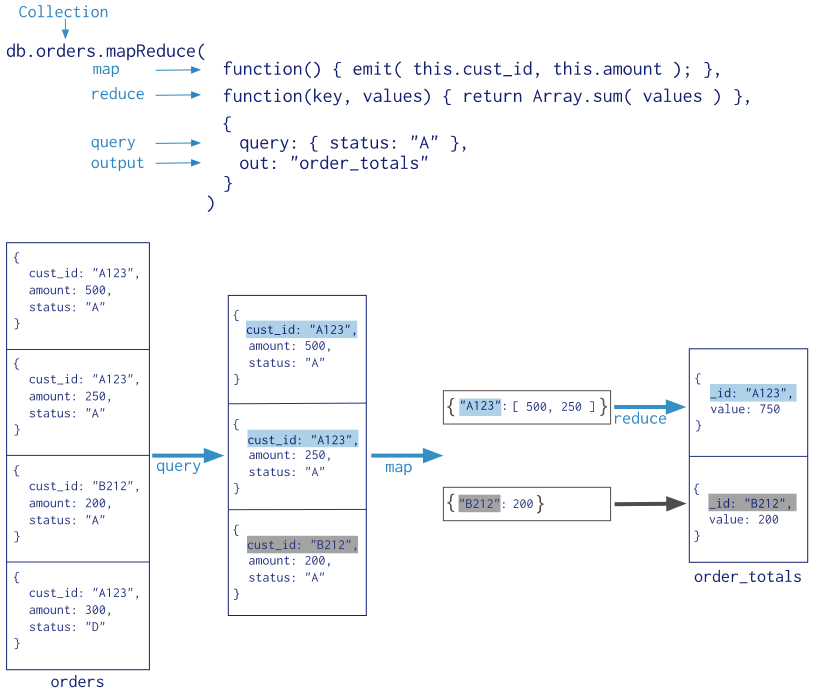
mapreduce分为两个阶段
map:Map阶段并行处理输入数据 reduce:Reduce阶段对Map结果进行汇总 例子:从interfaceLogMongo表中查询出interfaceCallType为2的数据,以interfaceCode分组统计出调用的总次数以及它的类型,并存入test数据表中。
mapreduce两种方法
 1
 2
 3
 4
 5
 6
 7
 8
 9
10
11
12
13
14
15
16
17
18
19
20
21
22
23
24
25
26
27
28
29
30
31
32
33
34
35
36
37
38
39
//法一
db . interfaceLogMongo . mapReduce (
function () {
emit ( this . interfaceCode , { count : 1 , type : this . interfaceType });
},
function ( key , values ) {
//统计的时候,如果想要统计出正确的次数,必须要用for循环
//使用total+=values[0].count()不会统计
var total = 0 ;
for ( var i in values ){
total += values [ i ]. count ;
}
return { count : total , type : values [ 1 ]. type }
},
{
query : {
interfaceCallType : 2
},
out : "test" //删表重存
}
)
//法二
db . runCommand ({
"mapreduce" : "interfaceLogMongo" ,
"map" : function () {
emit ( this . interfaceCode , { count : 1 , type : this . interfaceType });
},
"reduce" : function ( id , emits ) {
var total = 0 ;
for ( var i in emits )
total += emits [ i ]. count ;
var type = emits [ 1 ]. type ;
return { count : total , type : emits [ 1 ]. type };
},
"query" : {
interfaceCallType : 2
},
"out" : { merge : "test" } //merge表示追加
})
注意:由于mongo是基于js,单线程,单个节点跑mapreduce效率反而不如aggregate(agg framework使用c++)来的快。所以后续所有使用mapreduce的都换成了aggregate
mongo中MR与agg的比较,以及如何优化MR
aggregate 例子:从interfaceLogMongo中查出interfaceCallType为2的数据,以interfaceCode、interfaceName、interfaceType为主键分组,取他们的最大的interfaceResponseTime,取前5条并按倒序(由大到小)排序
aggregation中参数介绍
$match:相当于SQL中的where $group:相当于SQL中的group by $project:相当于SQL中的select $sort:相当于SQL中的order by $limit:相当于SQL中的limit 1
2
3
4
5
6
7
8
9
10
11
12
13
14
15
16
17
18
19
20
21
22
23
db . interfaceLogMongo . aggregate ([
{
$match : {
"interfaceCallType" : 2
}
},
{
$group : {
_id : {
"code" : "$interfaceCode" ,
"name" : "$interfaceName" ,
"type" : "$interfaceType"
},
max : { $max : "$interfaceResponseTime" }
}
}, {
$sort : {
max : - 1
}
}, {
$limit : 5
}
]);
索引CRD 以interfaceLogMongo这张表为例
索引值,1为按升序创建索引,-1为按降序创建索引
查询表的索引
1
db . interfaceLogMongo . getIndexes ();
创建单字段索引
1
2
// 按照interfaceResponseTime的降序创建索引
db . interfaceLogMongo . createIndex ({ "interfaceResponseTime" :- 1 })
创建复合索引
1
db . interfaceLogMongo . createIndex ({ "interfaceResponseTime" :- 1 , "interfaceCallType" : 1 })
数据量多大,创建索引也会比较耗时,可以让索引在后台执行
1
db . interfaceLogMongo . createIndex ({ "interfaceResponseTime" :- 1 , "interfaceCallType" : 1 },{ background : true })
展开
删除索引
1
2
db . interfaceLogMongo . dropIndex ( "索引名称" ); // 删除单个
db . interfaceLogMongo . dropIndexes (); //删除所有索引
索引优化 mongodb性能优化
查看执行过程,在语句上添加explain()即可。
如
1
db . interfaceLogMongo . explain (). find (). limit ( 5 ). sort ({ "interfaceResponseTime" :- 1 });
stage类型
COLLSCAN:全表扫描 IXSCAN:索引扫描 FETCH:根据索引去检索指定document SHARD_MERGE:将各个分片返回数据进行merge SORT:表明在内存中进行了排序 LIMIT:使用limit限制返回数 SKIP:使用skip进行跳过 IDHACK:针对_id进行查询 SHARDING_FILTER:通过mongos对分片数据进行查询 COUNT:利用db.coll.explain().count()之类进行count运算 COUNTSCAN:count不使用Index进行count时的stage返回 COUNT_SCAN:count使用了Index进行count时的stage返回 SUBPLA:未使用到索引的$or查询的stage返回 TEXT:使用全文索引进行查询时候的stage返回 PROJECTION:限定返回字段时候stage的返回 使用索引前
展开
耗时
展开
使用索引后
展开
耗时
展开
注意:并非所有的都可以使用索引来优化。
特别复杂的聚合查询,使用单字段索引 会变慢,使用聚合索引 效果也不明显,最后是通过分表 的方式来处理的。
三、MongoTemplate 3.1 普通CRUD mongoTemplate中提供的常用方法
find findOne findAll findDistinct:如果是多个字段distinct的话,还是使用aggregate比较好用。 insert:数据重复就会抛异常 save:数据重复则覆盖旧的数据 upsert:与save类似,有重复数据就会进行修改 remove
展开
3.2 mapReduce 语法:mongoTemplate.mapReduce(Query对象,表名或者实体类的字节码,map的js语句,reduce的js语法,返回实体的字节码)
以下面这个为例
 1
 2
 3
 4
 5
 6
 7
 8
 9
10
11
12
13
14
15
16
17
18
19
20
db . interfaceLogMongo . mapReduce (
function () {
emit ( this . interfaceCode , { count : 1 , type : this . interfaceType });
},
function ( key , values ) {
//统计的时候,如果想要统计出正确的次数,必须要用for循环
//使用total+=values[0].count()不会统计
var total = 0 ;
for ( var i in values ){
total += values [ i ]. count ;
}
return { count : total , type : values [ 1 ]. type }
},
{
query : {
interfaceCallType : 2
},
out : "test" //删表重存
}
)
java代码
1
2
3
4
5
6
7
8
9
10
//法一
mongoTemplate . mapReduce ( Query查询对象 , 表名或者实体类的字节码 ,
"function () {emit(this.interfaceCode, {count:1,type:this.interfaceType});}" ,
"function (id, emits) {var total=0;for(var i in values){total+=values[i].count;}return {count:total,type:values[1].type}}" ,
返回实体的字节码 );
//法二
mongoTemplate . mapReduce ( Query查询对象 , 表名或者实体类的字节码 ,
"classpath:map.js" ,
"classpath:reduce.js" ,
返回实体的字节码 );
3.3 aggregate 语法:mongoTemplate.aggregate(aggregation对象,表的名称或者表的字节码,返回对象的字节码)
获取aggregation对象:Aggregation.newAggregation(一串可变数组,可以是match、project、group、sort、limit等等)
以下面这个为例
1
2
3
4
5
6
7
8
9
10
11
12
13
14
15
16
17
18
db . interfaceLogMongo . aggregate ([
{
$group : {
_id : {
"code" : "$interfaceCode" ,
"type" : "$interfaceType" ,
"name" : "$interfaceName"
},
count : {
$sum : 1
}
}
}, {
$sort : {
count : - 1 // 1表示由小到大,-1表示由大到小
}
}
]);
java代码
1
2
3
4
5
6
Aggregation agg = Aggregation . newAggregation (
Aggregation . project ( "interfaceCode" , "interfaceType" , "interfaceName" ),
Aggregation . group ( "interfaceCode" , "interfaceType" , "interfaceName" ). count (). as ( "count" ),
Aggregation . project ( "count" ),
Aggregation . sort ( Sort . by ( "count" ). descending ()));
mongoTemplate . aggregate ( agg , 表的名称或者表的字节码 , 返回对象的字节码 )